🏗️ Classe Base Tool
Toda ferramenta do agente segue a mesma interface: tem um nome, uma descrição, parâmetros tipados e um método execute(). Essa uniformidade é o que permite ao Tool Registry tratar todas as ferramentas da mesma forma — registrar, descobrir e executar sem conhecer a implementação interna.
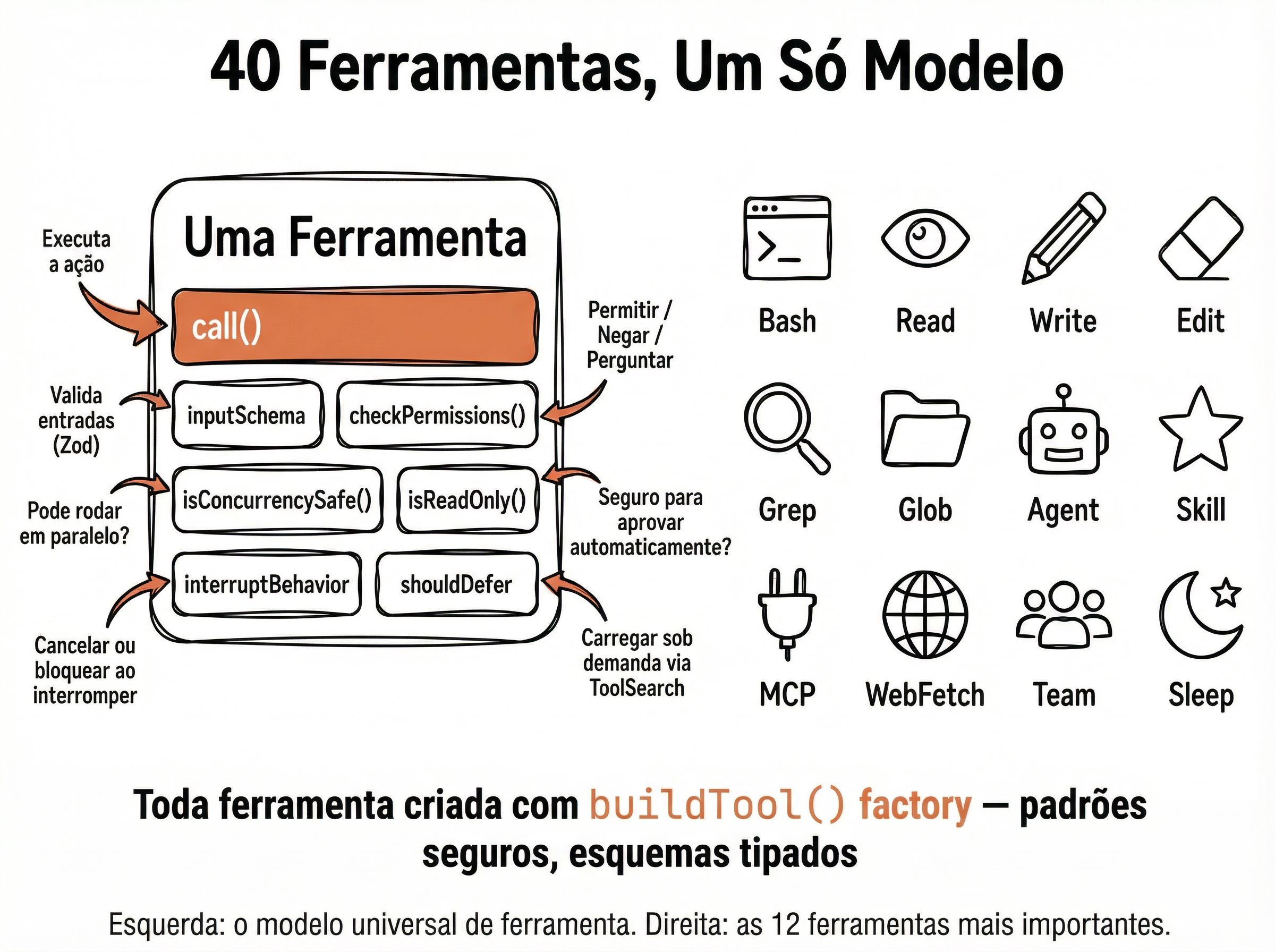
Interface Base de Ferramentas
# tools/base.py
from dataclasses import dataclass, field
from abc import ABC, abstractmethod
from typing import Any

@dataclass
class Tool(ABC):
    """Interface base para todas as ferramentas do agente."""
    name: str
    description: str
    parameters: dict = field(default_factory=dict)

    @abstractmethod
    def execute(self, **kwargs) -> str:
        """Executa a ferramenta e retorna resultado como string."""
        ...

    def to_schema(self) -> dict:
        """Gera o JSON schema para o LLM."""
        return {
            'type': 'function',
            'function': {
                'name': self.name,
                'description': self.description,
                'parameters': self.parameters
            }
        }

# Exemplo de uso:
@dataclass
class ReadFileTool(Tool):
    name: str = 'read_file'
    description: str = 'Read the full contents of a file'
    parameters: dict = field(default_factory=lambda: {
        'type': 'object',
        'properties': {
            'path': {'type': 'string', 'description': 'Absolute file path'}
        },
        'required': ['path']
    })

    def execute(self, path: str) -> str:
        from pathlib import Path
return Path(path).read_text(encoding='utf-8')📄 read_file e write_file
As ferramentas de leitura e escrita são a base de qualquer agente de código. read_file precisa lidar com encodings diferentes e arquivos inexistentes. write_file precisa criar diretórios pai automaticamente e reportar o resultado. Ambas devem NUNCA lançar exceções — erros viram strings de retorno para o LLM processar.
Implementação Completa — read_file e write_file
# tools/file_tools.py
from pathlib import Path

def read_file(path: str) -> str:
    """Lê o conteúdo completo de um arquivo."""
    try:
        p = Path(path)
        if not p.exists():
            return f"Error: file not found: {path}"
        if not p.is_file():
            return f"Error: not a file: {path}"
        # Limitar tamanho para não estourar context
        content = p.read_text(encoding='utf-8')
        if len(content) > 100_000:
            return content[:100_000] + f"\n\n... truncated ({len(content)} total chars)"
        return content
    except UnicodeDecodeError:
        return f"Error: file is binary or not UTF-8: {path}"
    except Exception as e:
        return f"Error: {e}"

def write_file(path: str, content: str) -> str:
    """Escreve conteúdo em um arquivo, criando diretórios se necessário."""
    try:
        p = Path(path)
        p.parent.mkdir(parents=True, exist_ok=True)
        p.write_text(content, encoding='utf-8')
        return f"OK: wrote {len(content)} chars to {path}"
    except PermissionError:
        return f"Error: permission denied: {path}"
    except Exception as e:
        return f"Error: {e}"

# Schemas para o LLM
READ_FILE_SCHEMA = {
    'type': 'function',
    'function': {
        'name': 'read_file',
        'description': 'Read the full contents of a text file given its path',
        'parameters': {
            'type': 'object',
            'properties': {
                'path': {'type': 'string', 'description': 'Absolute path to the file'}
            },
            'required': ['path']
        }
    }
}

WRITE_FILE_SCHEMA = {
    'type': 'function',
    'function': {
        'name': 'write_file',
        'description': 'Write content to a file, creating parent directories if needed',
        'parameters': {
            'type': 'object',
            'properties': {
                'path': {'type': 'string', 'description': 'Absolute path to write to'},
                'content': {'type': 'string', 'description': 'Content to write'}
            },
            'required': ['path', 'content']
        }
    }
}
💡 Nunca Lance Exceções nas Ferramentas
Se uma ferramenta lança uma exceção, o loop do agente quebra. Em vez disso, retorne o erro como string: return f"Error: {e}". O LLM sabe lidar com mensagens de erro — ele vai tentar outra abordagem ou reportar o problema ao usuário. O Claude Code segue exatamente esse padrão.
💻 run_shell com Segurança
A ferramenta run_shell é a mais poderosa e a mais perigosa. Ela dá ao agente acesso total ao sistema operacional — instalar pacotes, rodar testes, fazer git commits. Mas também pode deletar tudo, criar fork bombs ou minerar bitcoin. Validação de entrada e timeout são obrigatórios.
Implementação Segura — run_shell
# tools/shell_tool.py
import subprocess
import shlex

# Comandos que NUNCA devem ser executados
BLOCKED_PATTERNS = [
    'rm -rf /',
    'rm -rf /*',
    'dd if=',
    ':(){ :|:& };:',
    'mkfs.',
    '> /dev/sda',
    'chmod -R 777 /',
    'curl | sh',
    'wget | sh',
]

# Prefixos suspeitos que exigem cuidado extra
WARN_PREFIXES = ['sudo ', 'su ', 'docker rm', 'git push --force']

def run_shell(command: str, timeout: int = 60) -> str:
    """Executa comando shell com validação e timeout."""
    # 1. Bloquear comandos perigosos
    cmd_lower = command.lower().strip()
    for blocked in BLOCKED_PATTERNS:
        if blocked in cmd_lower:
            return f"BLOCKED: dangerous command detected: '{blocked}'"

    # 2. Executar com timeout
    try:
        result = subprocess.run(
            command,
            shell=True,
            capture_output=True,
            text=True,
            timeout=timeout,
            cwd=None  # herda o cwd do processo
        )
        output = result.stdout + result.stderr
        # 3. Truncar saída longa
        if len(output) > 50_000:
            output = output[:50_000] + f"\n... truncated ({len(output)} total chars)"
        if not output.strip():
            output = f"(exit code: {result.returncode}, no output)"
        return output
    except subprocess.TimeoutExpired:
        return f"Error: command timed out after {timeout}s"
    except Exception as e:
        return f"Error: {e}"

RUN_SHELL_SCHEMA = {
    'type': 'function',
    'function': {
        'name': 'run_shell',
        'description': 'Run a shell command and return stdout+stderr. Has a timeout and blocks dangerous commands.',
        'parameters': {
            'type': 'object',
            'properties': {
                'command': {'type': 'string', 'description': 'Shell command to execute'},
                'timeout': {'type': 'integer', 'description': 'Timeout in seconds (default 60)'}
            },
            'required': ['command']
        }
    }
}
🚨 Alerta de Segurança
A lista de BLOCKED_PATTERNS é apenas a primeira camada de defesa. Em produção, considere: (1) rodar o agente em um container Docker isolado, (2) usar seccomp para limitar syscalls, (3) montar o filesystem como read-only exceto diretórios específicos, (4) limitar CPU e memória. Nenhuma blacklist é perfeita — um LLM criativo pode encontrar formas de contornar.
🔍 search_in_files
Buscar texto em arquivos é essencial para um agente de código. Em vez de ler o projeto inteiro, o agente busca exatamente o que precisa — como o grep do Claude Code. Nossa implementação usa pathlib.glob() para encontrar arquivos e busca por regex para máxima flexibilidade.
Implementação Completa — search_in_files
# tools/search_tool.py
import re
from pathlib import Path

def search_in_files(
    pattern: str,
    directory: str = '.',
    glob: str = '**/*',
    max_results: int = 50
) -> str:
    """Busca regex em arquivos, similar ao grep -rn."""
    try:
        regex = re.compile(pattern, re.IGNORECASE)
    except re.error as e:
        return f"Error: invalid regex: {e}"

    results = []
    dir_path = Path(directory)

    if not dir_path.is_dir():
        return f"Error: not a directory: {directory}"

    for file_path in dir_path.glob(glob):
        if not file_path.is_file():
            continue
        # Ignorar binários e diretórios comuns
        if any(part.startswith('.') for part in file_path.parts):
            continue
        if file_path.suffix in ('.pyc', '.so', '.o', '.bin', '.exe'):
            continue

        try:
            content = file_path.read_text(encoding='utf-8')
            for i, line in enumerate(content.splitlines(), 1):
                if regex.search(line):
                    results.append(f"{file_path}:{i}: {line.strip()}")
                    if len(results) >= max_results:
                        return '\n'.join(results) + f"\n... (limited to {max_results} results)"
        except (UnicodeDecodeError, PermissionError):
            continue

    if not results:
        return f"No matches found for '{pattern}' in {directory}"
    return '\n'.join(results)

SEARCH_SCHEMA = {
    'type': 'function',
    'function': {
        'name': 'search_in_files',
        'description': 'Search for a regex pattern in files, like grep -rn. Returns file:line: match.',
        'parameters': {
            'type': 'object',
            'properties': {
                'pattern': {'type': 'string', 'description': 'Regex pattern to search for'},
                'directory': {'type': 'string', 'description': 'Directory to search in (default: current)'},
                'glob': {'type': 'string', 'description': 'Glob to filter files (default: **/*) e.g. **/*.py'}
            },
            'required': ['pattern']
        }
    }
}
📊 Performance: pathlib vs subprocess grep
pathlib.glob(): mais portável (Windows/Linux/Mac), sem dependência externa, mas mais lento em projetos grandes
subprocess + ripgrep: 10-100x mais rápido, mas precisa do rg instalado — ideal para projetos com 10k+ arquivos
Dica: comece com pathlib (simples), troque para ripgrep quando a performance importar
Claude Code usa ripgrep: o Grep tool do Claude Code é um wrapper otimizado sobre rg com caching
📋 Registro e Descoberta
Agora que temos todas as ferramentas, precisamos registrá-las em um lugar central. O registro completo inclui o TOOL_MAP para despacho e o TOOL_SCHEMAS para enviar ao LLM. Esse é o ponto de integração entre as ferramentas e o loop do agente.
Registry Completo — Todas as Ferramentas
# tools/registry.py
from tools.file_tools import (
    read_file, write_file,
    READ_FILE_SCHEMA, WRITE_FILE_SCHEMA
)
from tools.shell_tool import run_shell, RUN_SHELL_SCHEMA
from tools.search_tool import search_in_files, SEARCH_SCHEMA
import json

# Mapa central: nome → função
TOOL_MAP = {
    'read_file': read_file,
    'write_file': write_file,
    'run_shell': run_shell,
    'search_in_files': search_in_files,
}

# Schemas para enviar ao LLM
TOOL_SCHEMAS = [
    READ_FILE_SCHEMA,
    WRITE_FILE_SCHEMA,
    RUN_SHELL_SCHEMA,
    SEARCH_SCHEMA,
]

def execute_tool(name: str, arguments: str) -> str:
    """Despacha uma tool call do LLM para a função correta."""
    if name not in TOOL_MAP:
        return f"Error: unknown tool '{name}'"

    try:
        # arguments vem como JSON string do LLM
        args = json.loads(arguments) if isinstance(arguments, str) else arguments
        result = TOOL_MAP[name](**args)
        return result
    except json.JSONDecodeError:
        return f"Error: invalid JSON arguments for {name}"
    except TypeError as e:
        return f"Error: wrong arguments for {name}: {e}"
    except Exception as e:
        return f"Error executing {name}: {e}"

def list_tools() -> list[str]:
    """Lista nomes de todas as ferramentas registradas."""
    return list(TOOL_MAP.keys())

def get_tool_description(name: str) -> str:
    """Retorna a descrição de uma ferramenta."""
    for schema in TOOL_SCHEMAS:
        if schema['function']['name'] == name:
            return schema['function']['description']
    return "Unknown tool"
💡 Adicionar Novas Ferramentas é Trivial
Para adicionar uma nova ferramenta: (1) crie a função + schema, (2) importe no registry, (3) adicione ao TOOL_MAP e TOOL_SCHEMAS. Pronto — o loop do agente e o LLM já sabem usá-la automaticamente. Não precisa alterar nenhum outro arquivo. Esse desacoplamento é a maior vantagem do padrão Registry.
⚡ Execução Paralela
Quando o LLM pede múltiplas ferramentas na mesma iteração, podemos executá-las em paralelo — mas com cuidado. Ferramentas de leitura (read_file, search) são seguras para paralelizar. Ferramentas de escrita (write_file, run_shell) devem ser sequenciais para evitar race conditions. O Claude Code faz exatamente isso.
Execução Paralela com asyncio
# tools/parallel.py
import asyncio
from concurrent.futures import ThreadPoolExecutor
from tools.registry import execute_tool, TOOL_MAP

# Ferramentas que podem rodar em paralelo
READ_ONLY_TOOLS = {'read_file', 'search_in_files'}

executor = ThreadPoolExecutor(max_workers=4)

async def execute_tool_async(name: str, arguments: str) -> str:
    """Wrapper async para ferramentas sync."""
    loop = asyncio.get_event_loop()
    return await loop.run_in_executor(
        executor,
        execute_tool,
        name, arguments
    )

async def execute_tool_calls(tool_calls: list) -> list[dict]:
    """Executa múltiplas tool calls, paralelo quando seguro."""
    # Separar read-only (paralelo) de write (sequencial)
    read_calls = [tc for tc in tool_calls if tc['name'] in READ_ONLY_TOOLS]
    write_calls = [tc for tc in tool_calls if tc['name'] not in READ_ONLY_TOOLS]

    results = {}

    # 1. Executar read-only em paralelo
    if read_calls:
        tasks = [
            execute_tool_async(tc['name'], tc['arguments'])
            for tc in read_calls
        ]
        read_results = await asyncio.gather(*tasks)
        for tc, result in zip(read_calls, read_results):
            results[tc['id']] = result

    # 2. Executar writes sequencialmente
    for tc in write_calls:
        result = await execute_tool_async(tc['name'], tc['arguments'])
        results[tc['id']] = result

    # 3. Retornar na ordem original
    return [
        {'tool_call_id': tc['id'], 'content': results[tc['id']]}
        for tc in tool_calls
    ]

# Uso no loop do agente:
# results = asyncio.run(execute_tool_calls(response.tool_calls))
Fazer
- ✓ Paralelizar leituras (read_file, search) para ganhar velocidade
- ✓ Usar ThreadPoolExecutor para ferramentas I/O-bound
- ✓ Limitar workers para não sobrecarregar o sistema
- ✓ Retornar resultados na ordem original das tool calls
Evitar
- ✗ Paralelizar write_file — dois writes no mesmo arquivo = corrompido
- ✗ Paralelizar run_shell sem pensar — comandos podem ter dependências
- ✗ Ignorar exceções em tasks paralelas — use try/except em cada uma
- ✗ Criar threads ilimitadas — max_workers=4 é um bom default
📋 Resumo do Módulo
Próximo Módulo:
5.3 - 🔄 Montando o Loop Principal